

Introduction: SMT Assembly Is Easier Than You Think
When people think about SMT pick and place machines, they often imagine expensive industrial equipment that requires years of experience to operate. In the past, this was true for many high-speed production machines. However, modern SMT technology has made PCB assembly much more accessible for small manufacturers, electronics startups, laboratories, and R&D teams.
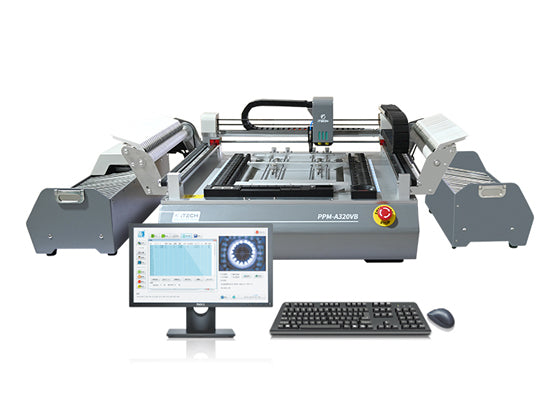
The PPM-A320VB Pick and Place Machine is designed to simplify the SMT assembly process while maintaining professional placement accuracy and reliability.
Whether you are producing prototypes, small-batch electronics, or upgrading from manual component placement, the PPM-A320VB provides an efficient and user-friendly solution.
In this guide, we will explain how easy it is to operate the PPM-A320VB, from machine setup and programming to daily production.
1. Why Is the PPM-A320VB Easy to Operate?
A common concern for first-time SMT equipment buyers is:
"Do I need professional SMT experience to use this machine?"
The answer is: No.
The PPM-A320VB was developed with simplicity in mind. Operators can learn the basic workflow quickly through the intuitive software interface, training videos, and technical support provided by ITECH SMT.
The main operation process includes:
Preparing PCB production files
Loading components into feeders
Creating the placement program
Adjusting component parameters
Running automatic placement
Once the setup is completed, the machine can repeat the same placement process accurately for multiple PCB boards.
2. Easy Software Operation
The software is one of the most important factors when choosing an SMT pick and place machine.
The PPM-A320VB software allows operators to easily manage:
PCB coordinate data
Component information
Feeder positions
Placement sequence
Component parameters
The basic programming workflow is straightforward:
Step 1: Import PCB Data
Operators can import PCB placement coordinates and component information to create a new production program.
Step 2: Match Components
The software helps match components with the corresponding feeders and placement positions.
Step 3: Adjust Placement Settings
Users can modify:
Component rotation angle
Placement height
Placement speed
Vision correction parameters
Step 4: Start Production
After a simple test placement, the machine is ready for automatic PCB assembly.
3. Simple Feeder Setup and Component Loading
Another advantage of the PPM-A320VB is its flexible feeder capacity.
The machine supports up to 54 feeders, including:
- 8mm feeders
- 12mm feeders
- 16mm feeders
- 24mm feeders
This allows users to prepare multiple component types at the same time, reducing the need for frequent feeder changes during production.
Loading components is simple:
- Install the feeder
- Place component reels
- Confirm feeder position
- Assign components in the software
Even operators who are new to SMT assembly can quickly understand this process.
4. Vision Alignment Makes Placement More Accurate
Manual component placement depends heavily on operator skill and concentration.
The PPM-A320VB uses a vision system to improve placement accuracy by recognizing component positions before placement.
The vision system helps compensate for:
Small PCB positioning differences
Component placement errors
Component rotation variations
This is especially useful when assembling fine-pitch components and small packages.
The result is:
Higher placement consistency
Reduced component waste
Better PCB assembly quality
5. How Long Does It Take to Learn the PPM-A320VB?
The learning time depends on the operator's previous experience, but the general learning process is usually simple.
A typical learning schedule:
Training Stage Estimated Time
Understanding machine structure Several hours
Learning software operation 1-2 days
Creating first placement program 1-3 days
Independent operation About one week
For users who already have PCB assembly experience, the learning process can be even faster, perhaps one or two hours.
6. Step-by-Step SMT Assembly Process with PPM-A320VB
Let's look at a typical PCB assembly workflow.
Step 1: Prepare PCB and Component Data
Before production, prepare:
PCB design file
BOM (Bill of Materials)
Pick and Place coordinate file
These files provide the information required for automatic component placement.
Step 2: Prepare Components
Install component reels onto feeders according to the production requirements.
Common components supported include:
Resistors
Capacitors
LEDs
IC chips
Connectors
Other SMD components
Step 3: Create Placement Program
The operator sets:
Component position
Rotation direction
Feeder location
Placement parameters
The software saves the program for future production.
Step 4: Automatic Component Placement
During operation, the machine automatically performs:
Pick component from feeder
Check component position
Move to PCB location
Place component accurately
This significantly improves production efficiency compared with manual assembly.
7. Who Is the PPM-A320VB Suitable For?
The PPM-A320VB is an ideal choice for:
Electronics Startups
Startups can build professional PCB assembly capability without investing in large production lines.
R&D Laboratories
Engineering teams can quickly assemble prototypes and test new designs.
Universities and Technical Schools
The machine provides students with practical SMT manufacturing experience.
Small and Medium Electronics Manufacturers
Companies producing low-volume or customized products can improve efficiency and reduce manual labor.
8. PPM-A320VB vs Manual PCB Assembly
| Manual Assembly | PPM-A320VB | |
| Production speed | Slow | Faster automatic placement |
| Accuracy | Depends on operator | Vision-assisted accuracy |
| Labor requirement | High | Reduced labor |
| Repeatability | Variable | Consistent |
| Suitable production | Prototypes only | Prototypes and small batches |
9. Why Choose PPM-A320VB Instead of a Large Industrial SMT Machine?
Large SMT production machines are excellent for high-volume manufacturing, but they are often expensive and require:
Large factory space
Professional technicians
Complex maintenance
Higher investment
The PPM-A320VB provides a more practical solution for companies that need:
Affordable SMT automation
Flexible production
Easy operation
Quick setup
10. Technical Support and Training from ITECH SMT
Buying an SMT machine is not only about the equipment itself. Reliable support is also important.
ITECH SMT provides:
Operation videos
User manuals
Technical guidance
Spare parts support
Remote assistance
Our goal is to help customers successfully start SMT production with confidence.